


Read time: 4 Min
Finding out that your hard disk is corrupt is a nightmare, especially when it contains your important data. Corruption of the hard drive can cause inaccessibility or loss of data stored in it. But don’t panic, as in most cases, data recovery is possible from a corrupt hard drive. In this article, we will share various methods to recover data from corrupt hard drive.
Recover Data from Corrupt Hard Drive
Before starting the process to recover data from corrupt hard drive, it is important to know whether your hard disk is corrupt. Here are the common signs of a corrupt hard drive.
- The hard drive is opening.
- Error message: “You need to format the disk”.
- A few files or folders are missing.
- The hard disk is making a noise.
- The hard drive and partitions are not detected by the system.
- System taking too much time to respond.
Do not worry if you have these symptoms. We’re going to show you a few different ways to recover data from corrupt hard drive.
Methods to Repair Corrupt Hard Drive
There are two common techniques to repair a corrupt hard disk. One is CHKDSK, which is an inbuilt feature for repairing a corrupt file system, and the second method is repairing the hard disk with the drive repair feature. Let us learn both methods to repair a corrupt hard drive in this section.
Method 1: Run CHKDSK to Fix System Error
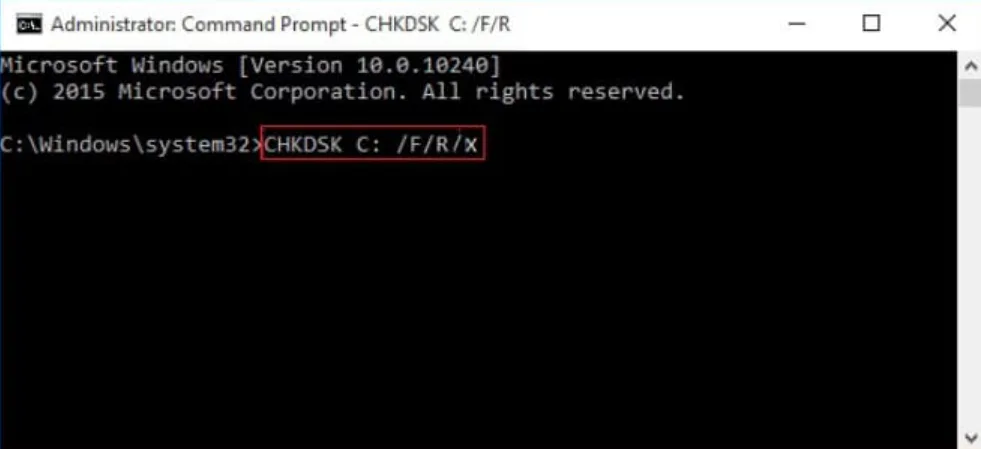
Using the command prompt window, you can repair damaged sectors on the disk. The steps are as follows:
- Select Command Prompt by pressing the Windows and R keys simultaneously.
- Open the command prompt in administrator mode.
- To check for problems, type CHKDSK on your computer’s command line.
- Enter the next command to correct the mistakes: CHKDSK D: /f /r /x (substitute the damaged drive letter for D).
Solution 2: Repair Hard Drive using File Manager
Can a dead hard drive still hold data? You can take a backup and fix the disk problem using the file manager. Steps consist of:
- Combine the Win and E keys.
- From the left pane, choose the corrupted disk.
- Right-click on the corrupted disk and click Properties.
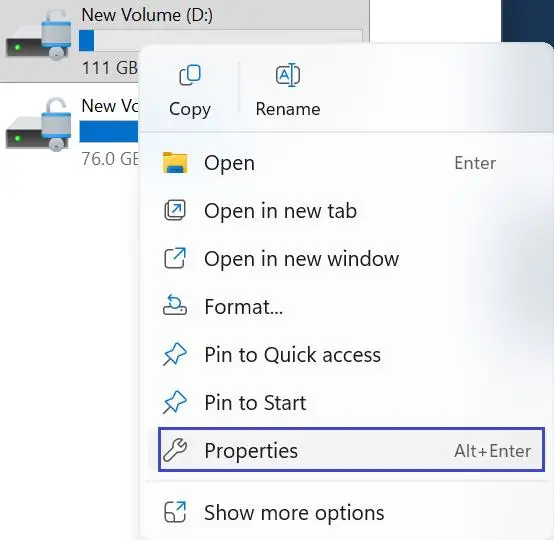
- Click Tools > Check to check for errors.
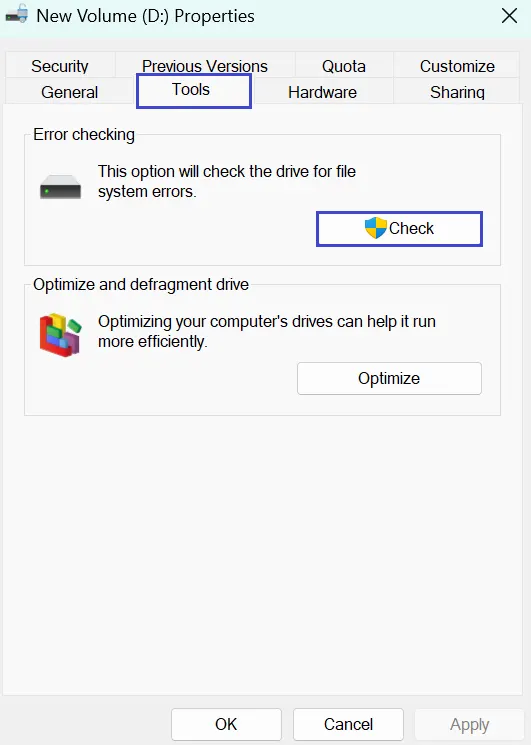
- After the scan is finished, select “Repair this Drive” to address any issues.
Recover Data from Corrupt Hard Drive with Data Recovery Software
Data may be recovered from corrupted hard drives, disks, SSDs, SD cards, external hard drives, RAW drives, and USBs with the help of efficient data recovery software. The wizard can easily locate the files even if you accidentally erased them. It serves as a complete tool for all of your recovery-related activities. Forget about trying to recover data from a dead hard drive.

- Recovering data that was lost as a result of an inappropriate operation, such as improper media removal.
- Recovery of data from a hidden, corrupted, formatted, or erased drive.
- Recover files from drives with a RAW file system or drives that are unavailable or unreadable.
Summary
This article is very helpful for recovering data from a corrupt hard drive using powerful data recovery software. This Windows data recovery tool is capable of dealing with corrupt hard drive recovery, dead hard drive recovery, formatted hard drive recovery, external hard drive recovery, pen drive, and other data storage devices, as well as RAID storage and NAS devices. This data recovery program can repair corrupt files, corrupt images, corrupt videos, corrupt databases, and so on easily.
Recommend data recovery software is a perfect solution and is capable enough to recover data from corrupt hard drive or from a dead hard drive with any file system like FAT, FAT32, NTFS, and NTFS5.